Simple Calculator: A Practical Guide to Choosing and Using the Right Tool
In an era dominated by complex software suites and AI-driven analytics, the humble Simple Calculator often gets overlooked. Yet, for millions of users—from students checking homework to entrepreneurs verifying quick margins—this tool remains indispensable. The appeal lies in its immediacy. You do not need a login, a subscription, or a tutorial to use it. However, assuming that all basic calculators are created equal is a common misconception that can lead to frustrating errors, wasted time, and even financial miscalculations.
Whether you are integrating a calculator illustration into a design project or relying on a digital tool for daily tasks, understanding the nuances of these tools is essential. Many people treat them as black boxes, inputting numbers and accepting outputs without question. This passive approach ignores the potential for user error, interface confusion, and functional limitations. By adopting a more critical eye, you can ensure that your calculations are accurate, your workflow is efficient, and your design choices are effective.
The Trap of Overlooking Interface Clarity
One of the most frequent mistakes users make is ignoring the visual layout of their calculator. In digital environments, especially on mobile devices, button size and spacing matter immensely. A cluttered interface with tiny touch targets invites typos. Imagine trying to calculate a tip at a restaurant while rushing to leave; hitting the "8" instead of the "9" because the buttons are too close together changes the result significantly. This is not just a minor inconvenience; it undermines trust in the tool.
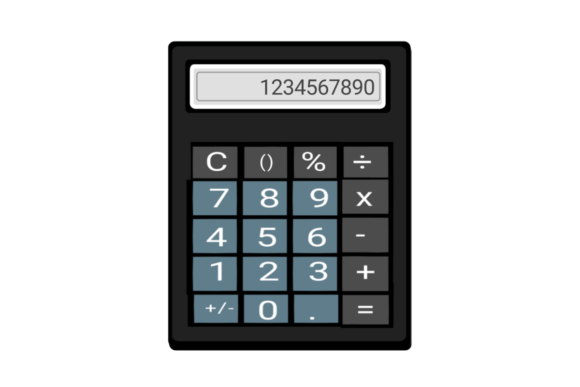
For designers and developers creating calculator illustrations or functional widgets, this oversight is critical. If you are designing a user interface, prioritize whitespace and clear typography. A Simple Calculator should not look like a cockpit. It should be intuitive. Users should be able to distinguish between the subtraction sign and the negative symbol instantly. When evaluating a tool, check if the display clearly shows your entire equation, not just the current number. Seeing the full history of your input allows you to spot errors before you hit "equals."
Misunderstanding Order of Operations
A subtle but dangerous misunderstanding involves how different calculators handle mathematical order of operations, often referred to as PEMDAS or BODMAS. Not all basic calculators process inputs sequentially. Some older or simpler models perform operations exactly as they are entered, while others follow standard algebraic rules. This distinction can lead to drastically different results.
Consider the expression 2 + 3 × 4. A calculator that follows order of operations will multiply 3 by 4 first, then add 2, resulting in 14. A basic sequential calculator might add 2 and 3 first, then multiply by 4, resulting in 20. If you are using a Simple Calculator for budgeting or engineering estimates, assuming it handles precedence correctly without testing it can lead to significant financial or structural errors. Always test your tool with a known complex equation before relying on it for critical data. If the tool lacks parentheses functionality, you must manually manage the order of operations, which increases cognitive load and the risk of mistake.
Ignoring Precision and Rounding Errors
Another overlooked detail is how a calculator handles decimal places. In casual use, rounding differences seem negligible. However, for freelancers billing by the hour or small business owners calculating tax percentages, cumulative rounding errors can distort your bottom line. Many simple tools truncate decimals rather than rounding them properly, or they limit display to two decimal places while keeping higher precision internally. This discrepancy can cause confusion when you try to reconcile your calculated figures with bank statements or invoices.
To avoid this, check the settings or documentation of your digital calculator. Does it allow you to set the number of decimal places? Does it round half-up or half-to-even? For high-stakes calculations, it is often better to use a spreadsheet where you can control formatting explicitly. If you are sticking to a basic tool, be aware of its limitations and double-check critical figures using a secondary method. Never assume the displayed number is the exact number stored in memory.
The Design Perspective: Function vs. Aesthetics
For creators and marketers, the Simple Calculator is not just a utility; it is a visual element. When incorporating calculator illustrations into web designs, presentations, or educational materials, there is a tendency to prioritize aesthetics over realism. While stylized icons have their place, misleading representations can confuse users. For instance, using an image of a scientific calculator with trigonometric functions to represent a basic addition tool creates a disconnect. Users may expect advanced features that are not present, leading to frustration.
Ensure that your visual assets match the functionality you are offering. If you are designing a landing page for a financial service, a clean, minimalist calculator illustration conveys transparency and ease. Avoid cluttering the design with unnecessary buttons or decorative elements that distract from the core purpose. The goal is communication clarity. A well-designed calculator graphic should signal simplicity and reliability. Test your design with real users to ensure they understand what the tool does at a glance. If they hesitate or look for non-existent features, your design needs refinement.
Security and Privacy in Online Tools
In today’s digital landscape, even simple tools can pose privacy risks. Many free online calculators are supported by ads or data tracking. While entering "5 + 5" seems harmless, some platforms may log your IP address, device information, or usage patterns. For professionals handling sensitive client data, using an unverified third-party calculator website can be a security oversight. Always prefer reputable sources or offline applications when dealing with proprietary or confidential numbers.
Before bookmarking a new online calculator, check its privacy policy. Does it store your inputs? Does it use cookies for tracking? If the answers are unclear, look for an alternative. Open-source calculators or built-in operating system apps are often safer bets because they do not rely on ad revenue models that incentivize data collection. Protecting your digital footprint starts with being selective about the tools you use, no matter how simple they appear.
Best Practices for Daily Use
To maximize the utility of your Simple Calculator, adopt a few habitual checks. First, always clear the memory before starting a new calculation sequence. Residual values in memory registers are a common source of silent errors. Second, use the percentage function with caution. Different calculators interpret percentage inputs differently depending on the preceding operator. Verify the behavior with a test case like "100 + 10%" to see if it adds 10 (resulting in 110) or interprets it differently.
- Verify Critical Inputs: Double-check large numbers by breaking them into smaller chunks.
- Understand Your Tool: Read the manual or help section, even for basic apps.
- Cross-Reference: For important decisions, use two different methods or tools to confirm results.
- Maintain Visual Clarity: Keep your screen clean and free from distractions when calculating.
By treating the Simple Calculator with the respect it deserves, you transform it from a basic gadget into a reliable partner in your daily workflow. Whether you are designing a user interface, balancing a budget, or solving a quick math problem, awareness of these common pitfalls ensures accuracy and efficiency. Remember, the simplicity of the tool should not imply simplicity in its application. Thoughtful usage leads to better outcomes, fewer errors, and greater confidence in your results.