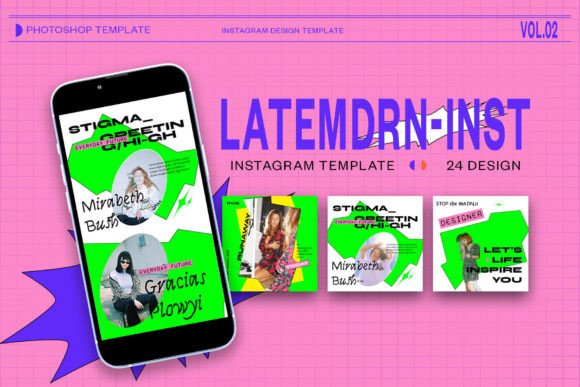
Latemdrn Instagram Template PSD: A Practical Evaluation for Content Creators
In the fast-paced world of social media marketing, visual consistency is often the differentiator between a brand that looks professional and one that appears amateurish. For designers, marketers, and small business owners, creating high-quality Instagram content from scratch for every post is rarely sustainable. This is where pre-designed templates, such as the Latemdrn Instagram Template PSD, enter the workflow. Rather than starting with a blank canvas, users leverage these resources to streamline production while maintaining a distinct aesthetic.
However, not all template packs are created equal. Understanding the specific features, technical requirements, and ideal use cases of the Latemdrn package is essential before integrating it into your design stack. This article explores what this template offers, how it compares to alternative design approaches, and who stands to benefit most from its structure.
Understanding the Technical Foundation
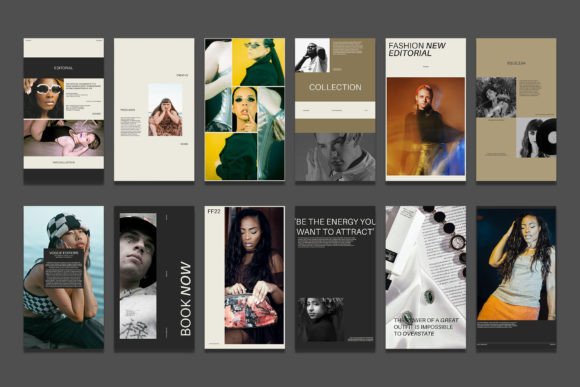
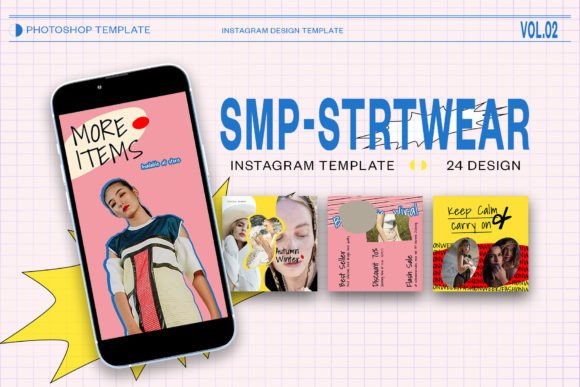
The core value of any Photoshop template lies in its usability and technical robustness. The Latemdrn Instagram Template PSD is built on industry-standard specifications, ensuring compatibility with most modern design workflows. It includes both feed posts and story formats, addressing the two primary consumption methods on the platform.
Key technical specifications include:
- Resolution: The files are set at 300 DPI (dots per inch). While screen displays typically render at 72 PPI, starting with a higher resolution ensures that if any element needs to be repurposed for print or high-density displays, the quality remains sharp.
- Color Mode: Designed in RGB, which is the correct color space for digital screens, ensuring that colors appear vibrant and accurate on mobile devices.
- Dimensions: The pack covers standard square posts (1080 x 1080 px) and vertical stories (1920 x 1080 px), aligning perfectly with Instagram’s current aspect ratio requirements.
- Smart Objects: This is arguably the most critical feature. The template utilizes Smart Objects for image placement, allowing users to insert their photos without distorting the original aspect ratio or losing quality.
The inclusion of Smart Objects significantly reduces the learning curve for non-designers. Instead of manually masking, resizing, and aligning images, the user simply double-clicks the image layer icon, places their photo, saves, and the template updates automatically. This "drag-and-drop" efficiency is a major time-saver for those managing high-volume content calendars.
Customization and Editability
A common frustration with free or low-cost templates is rigid structures that do not allow for meaningful customization. The Latemdrn template addresses this by making all text elements fully editable via the text tool. Users can adjust fonts, sizes, colors, and positioning to match their brand guidelines.
This flexibility is crucial for maintaining brand identity. While the template provides a structural foundation, the ability to tweak typographic hierarchy means that two brands using the same template can still produce visually distinct content. For professionals, this means the template serves as a wireframe rather than a final product, allowing for creative adaptation without rebuilding the layout from scratch.
Comparing Templates to Alternative Design Approaches
When deciding whether to use a PSD template like Latemdrn, it is helpful to weigh it against other common design strategies. Each approach has distinct tradeoffs regarding time, cost, and creative control.
Templates vs. Custom Design from Scratch
Designing every post from scratch offers maximum creative freedom but demands significant time and expertise. For a solo entrepreneur or a small marketing team, this is often inefficient. The Latemdrn template sacrifices some uniqueness for speed. If your brand relies on highly experimental, avant-garde visuals that break grid structures, a pre-made template may feel restrictive. However, for consistent, clean, and professional feeds, templates provide a reliable baseline that ensures visual cohesion across weeks or months of posting.
PSD Templates vs. Canva or Online Builders
Online design tools have gained immense popularity due to their browser-based convenience. However, they often lack the precision and advanced layer control of Adobe Photoshop. PSD templates like Latemdrn offer superior handling of complex effects, blending modes, and high-resolution assets. If you require precise kerning, custom shadows, or intricate photo manipulation, a PSD file is superior. Conversely, if you need to collaborate with non-designers who do not have Photoshop installed, an online builder might be more practical despite its limitations in design fidelity.
Static PSDs vs. Motion Graphics Tools
With the rise of Reels and animated stories, static images are no longer the only format that matters. The Latemdrn template is designed for static content. If your strategy heavily prioritizes video or motion graphics, you may need to supplement this PSD pack with After Effects templates or video editing software. However, static posts remain a cornerstone of Instagram engagement, particularly for carousels and educational content, where readability and clear visual hierarchy are paramount.
Best-Fit Scenarios for Latemdrn
Identifying whether this template aligns with your needs depends on your specific goals and resources. The Latemdrn Instagram Template PSD is particularly well-suited for:
- Small Business Owners: Individuals who wear multiple hats and need to produce professional-looking marketing materials without hiring a full-time designer.
- Social Media Managers: Professionals managing multiple accounts who need to scale content production while maintaining a consistent aesthetic for each client.
- Influencers and Personal Brands: Creators who want to elevate their feed’s visual appeal beyond casual smartphone photos, adding a layer of polish that signals professionalism.
- Agencies: Teams that need a quick starting point for client presentations or mood boards before moving into fully custom design phases.
In these scenarios, the balance between ease of use and professional output makes the template a valuable asset. The ability to quickly swap images and update text allows for rapid iteration, which is essential when testing different content styles or responding to trending topics.
Potential Limitations and Considerations
While the Latemdrn template offers many advantages, it is not a universal solution. Users should be aware of certain limitations:
- Software Dependency: You must have Adobe Photoshop installed. This excludes users who rely solely on mobile apps or free alternatives like GIMP, unless they are willing to navigate compatibility issues.
- Learning Curve: Although Smart Objects simplify the process, users still need a basic understanding of Photoshop layers and navigation. Complete beginners may find the interface intimidating initially.
- Generic Aesthetics: Because templates are sold to a wide audience, there is a risk that your content may look similar to others using the same pack. To mitigate this, it is essential to customize colors, fonts, and imagery significantly to reflect your unique brand voice.
Making an Informed Decision
Choosing the right design resource is about balancing efficiency with authenticity. The Latemdrn Instagram Template PSD is a strong contender for those seeking a professional, streamlined workflow within the Adobe ecosystem. Its high-resolution standards, smart object functionality, and editable text layers provide a solid foundation for consistent social media presence.
Before purchasing or downloading, consider your current design proficiency and long-term content strategy. If you value speed and professional polish and already use Photoshop, this template can significantly reduce your production time. However, if you require collaborative cloud-based editing or heavy motion graphics, you may need to complement this tool with other platforms.
Ultimately, the best template is one that you will actually use. By lowering the barrier to entry for high-quality design, tools like Latemdrn empower creators to focus less on technical execution and more on the message and value they deliver to their audience. Evaluate your needs, test the workflow, and determine if this structured approach aligns with your brand’s visual journey.