City Instagram Puzzle Feed Guide
Social media moves fast, and keeping your profile looking cohesive can feel like a full-time job. For many creators and business owners, the pressure to post high-quality content daily often leads to burnout or a disjointed aesthetic. This is where a structured approach to visual planning becomes essential. The City - Instagram Puzzle Feed offers a streamlined solution for those who want a polished, professional look without spending hours on graphic design. By utilizing a pre-designed grid system, you can curate weeks of content in advance, ensuring your feed tells a consistent story while saving valuable time.
Understanding the Puzzle Grid Concept
An Instagram puzzle feed, sometimes called a mosaic or grid layout, breaks a larger image or theme into smaller, square posts. When viewed individually, each post stands on its own, but when viewed together on your profile, they form a seamless, larger picture. This technique creates a striking visual impact that encourages visitors to scroll through your history, increasing engagement and time spent on your profile.
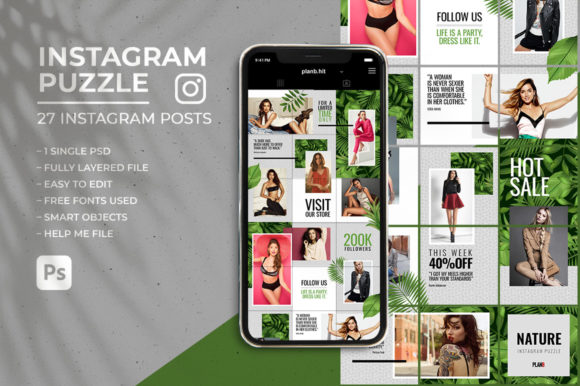
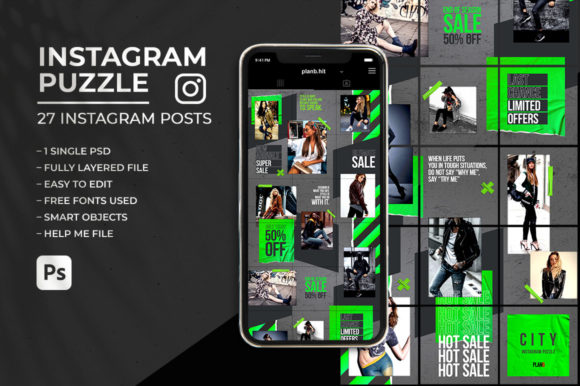
The City - Instagram Puzzle Feed template takes this concept and makes it accessible even for those with basic design skills. Instead of starting from scratch, you are provided with a fully organized Photoshop file. This multipurpose Instagram puzzle grid allows you to simply drop in your photos and text. The heavy lifting regarding alignment, spacing, and design consistency has already been done for you. With just a few clicks, you can split your grid and have a trendy, ready-to-upload feed that looks like it was created by a professional agency.
Why Consistency Matters for Your Brand
In the digital landscape, first impressions are often visual. A chaotic or inconsistent feed can confuse potential followers and dilute your brand message. Whether you are a small business owner, a freelancer, or a lifestyle blogger, a cohesive aesthetic builds trust and recognition. Using a tool like the City - Instagram Puzzle Feed helps maintain this consistency effortlessly.
One of the primary benefits of this specific template is its ability to help you plan ahead. Content creation is not just about taking photos; it is about strategy. By curating your content weeks in advance, you free up mental space to focus on engagement and community building. You no longer need to worry about what to post tomorrow because your next nine, eighteen, or twenty-seven posts are already designed and scheduled. This forward-thinking approach reduces stress and ensures that your online presence remains active and attractive, even during busy periods.
Key Features and Usability
For many users, the barrier to entry for complex design tools is the learning curve. However, this template is designed with usability in mind. It comes as a single PSD file compatible with Photoshop CS6 or above, making it accessible to a wide range of users. The file features organized layers, which means you can easily navigate through the different elements of your design without getting lost in a cluttered workspace.
Here are some of the standout features that make this tool particularly valuable:
- Smart Object Integration: You can add your own images using easy-edit smart objects. This ensures that your photos fit perfectly into the designated spaces without distortion or manual resizing headaches.
- One-Click Export: Time is money, especially for entrepreneurs. This template allows you to easily export all 27 posts in one click. This feature alone can save hours of repetitive work compared to saving each image individually.
- Seamless Continuity: The beginning and end of the grid match, allowing for seamless continuous use. This means you can keep using the template indefinitely, creating an endless loop of cohesive content that flows naturally from one set of posts to the next.
- Standard Dimensions: Each individual Instagram post is sized at 1080px x 1080px, which is the optimal resolution for clarity and quality on the platform.
Additionally, the template uses free fonts, with download links included in the help file. This ensures that you do not need to purchase expensive typography licenses to achieve a professional look. The design elements are organized in layers, making it simple to replace text, adjust colors, or tweak minor details to better suit your specific brand identity.
Practical Applications for Different Users
The versatility of the City - Instagram Puzzle Feed makes it suitable for a variety of contexts. Here is how different users can leverage this tool:
Small Business Owners and Entrepreneurs: Use the grid to showcase product lines, announce sales, or share customer testimonials. The cohesive look reinforces brand professionalism and can highlight multiple products within a single campaign.
Bloggers and Influencers: Create thematic series, such as travel diaries or fashion lookbooks. The puzzle format allows you to tell a broader story across multiple posts, encouraging followers to engage with your entire narrative rather than just a single image.
Educators and Coaches: Break down complex topics into bite-sized tips. Each square can contain a part of a larger infographic or a step-by-step guide, making educational content visually appealing and easy to digest.
Event Promoters: Build anticipation for upcoming events by releasing teaser images that form a larger poster or announcement when viewed on the profile. This creates buzz and encourages users to visit your page to see the full picture.
Important Considerations Before You Start
While the City - Instagram Puzzle Feed simplifies the design process, there are a few things to keep in mind to ensure the best results. First, you will need Adobe Photoshop CS6 or later, with CC recommended for the smoothest experience. If you are completely new to Photoshop, the included "Help me" file is a crucial resource. It provides instructions to help you get started, so take the time to read through it before diving in.
It is also important to note that the images used in preview materials are for demonstration purposes only and are not included in the download. You will need to source your own high-quality photos. Since the grid relies on visual continuity, ensure that your images have a consistent color palette or lighting style. This will enhance the overall effect of the puzzle feed.
Finally, remember that while the template handles the layout, your content strategy drives engagement. Use the time saved on design to craft compelling captions and engage with your audience. The City - Instagram Puzzle Feed is a powerful tool for aesthetics, but your unique voice and value proposition are what will ultimately grow your community.
By combining efficient design tools with strategic planning, you can elevate your Instagram presence significantly. This template offers a practical, professional, and time-saving way to achieve a stunning feed that captures attention and communicates your brand message clearly.